 Sunscript
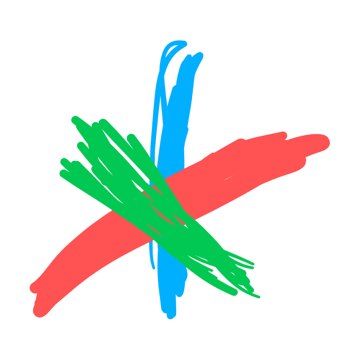
Three lines, six directions.
Where on the screen you swipe doesn’t matter. Neither does length or speed. What counts is the direction and what your finger does along the way.
- Blue: almost vertical. Up is a, down is i.
- Red: shallow, like “/”. Up-right is e, down-left is o.
- Green: slanted, like “\”. Up-left is u, down-right is y.
Swipe and let go: a vowel. The rest: consonants.
Here are all six on the blue line, upward. The other lines work the same way.
Space, delete, commands
Tap: space. Double tap: delete a letter. Tap, then swipe left and hold: deletes letter by letter while you hold. Long press (half a second in place): commands. The cheat sheet shows them; then swipe, without lifting if you like: ↑ capital, ↓ Enter, ↗ symbols, ↘ language, ↖ apostrophe.
With two hands
Whichever finger touches first is the first beat. Tap, then a line: pause. A line, then a tap: hold. Two lines the same way: next. Opposite ways: back.
No install, right here.
Swipe with a finger or a mouse on the dark field. Below is the alphabet, with each letter’s gesture next to it. English and Ukrainian share one logic: the same sound is written with the same gesture.
Four games.
Learn: one kind of gesture at a time, first repeat with a hint, then recall without it. Word: one word or phrase again and again, for speed, with your own ranking. Sprint: 60 seconds, more often the letters you get wrong. By ear: hear a letter’s sound and write it. Records stay on this device.
×1